



Remote Linux Server Monitoring on a Phone
This article is a translation of the following my article:
Original: スマホでサーバーを遠隔監視する
* Translated automatically by Google.
* Please note that some links or referenced content in this article may be in Japanese.
* Comments in the code are basically in Japanese.
by bokumin
Remote Linux Server Monitoring on a Phone
Introduction
I created an app to manage my home server.
- I want to check the server status on the go
- I want to know the server status even on holidays
- I want to check the server status at any time
SSH Monitor
https://play.google.com/store/apps/details?id=net.bokumin45.sshmonitor
This is an application that allows you to monitor Linux server resources in real time from your smartphone.
You can connect securely using the SSH protocol and monitor the following information:
- CPU
- MEM
- DISK
- GPU
- Operating hours
Main features
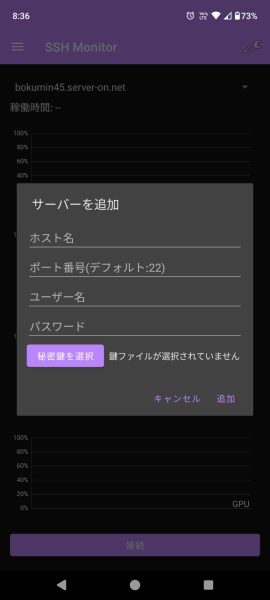
The operation is simple, first add a server.
You must enter at least the host name and user name.
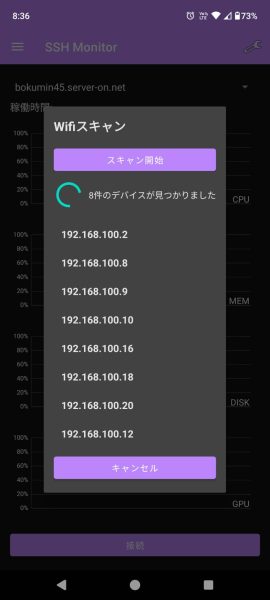
Wifi scanning is now possible, and devices are searched and displayed based on commonly used port numbers.
It is designed to be displayed even if numbers other than number 22 are open, so it may be displayed quite a bit for some people.
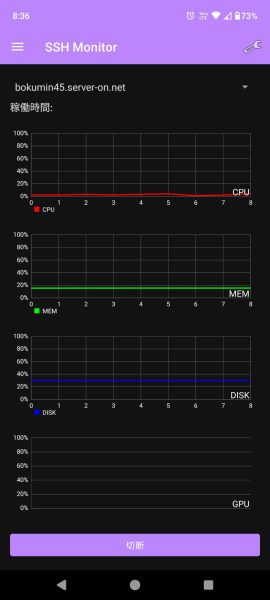
After adding, press the “Connect” button and the server usage rate will be graphed via SSH.
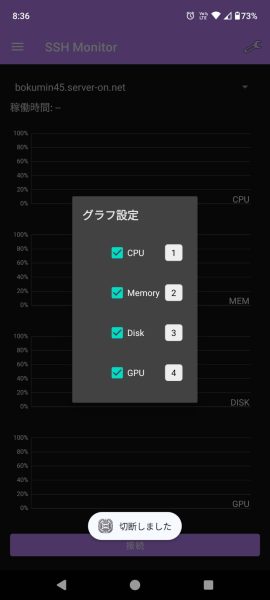
It is now possible to change the order of graphs and the graphs to be displayed so that unnecessary graphs can be hidden.
In this way, I have added all the functions that I, a beginner in app creation, could think of.
*I added a function to switch to English, but it works when debugging, but for some reason it doesn’t reflect when I install it from the store. If anyone knows the reason, please contact me
Server-side preparation
No special settings are required. As long as your SSH client is working, you should be fine.
Although I created it for Linux servers, I think it can also be used on Windows servers as long as you use WSL etc., install SSH, and open the port.
Notes on usage
As long as you follow modern security recommendations, you should be fine.
Use strong passwords
- Set a password of sufficient length and complexity
- Regular password updates recommended
Secure network environment
- Avoid using on public Wi-Fi
- Recommended access via VPN
Access control
- Minimum required permission settings
- Regular confirmation of access log
Privacy
All connections are stored encrypted on your device. There is no transmission to external servers, so please use it with confidence.
The source code of this app is posted below, so please check it out
https://github.com/bokumin/sshmonitor
At the end
Personally, I’m glad I made this because I usually have to enter the TOP command on my PC or SSH-Connect when checking the server status. If you are interested, please download and try it out.
This is my first time developing an app, and it was more troublesome to publish it on Google Play than it was to create the app. I would like to write more articles about this.
End