* Translated automatically by Google. * Please note that some links or referenced content in this article may be in Japanese. * Comments in the code are basically in Japanese.
by bokumin
Viewing wget 2.20 Through Code.
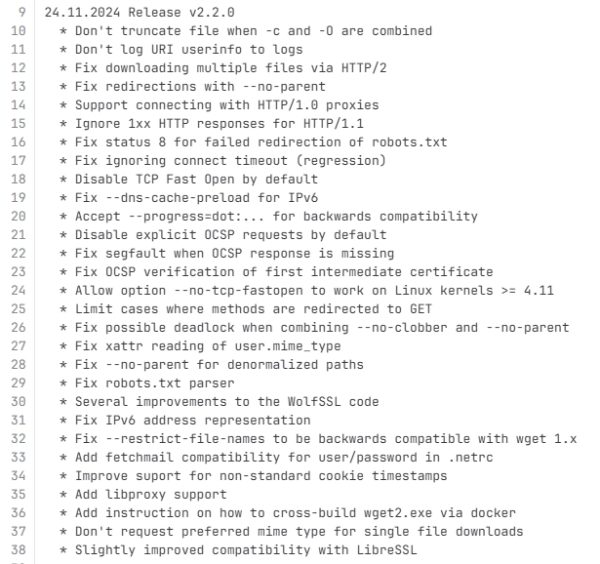
wget 2.20 was released on November 24th (local time). This update has major improvements in core functionality, so we would like to introduce them to you.
This prevents the authentication information from being left in the log file when entering a user and password to retrieve a file. This will reduce the number of issues pointed out during security audits.
To summarize OCSP-related information, it is as follows: – Explicit OCSP is now disabled by default. – Fixed crash when OCSP response is missing. – Improved OCSP intermediate certificate verification process.
TCP Fast Open (TFO) is now disabled by default. TFO seems to have been disabled due to security and privacy concerns, as it could be used for tracking by third parties, and there were issues with middleboxes that do not support TFO.
There is now strict control over method changes during redirects. For 301,302,303, automatic changes to HTTP redirects have been restricted. This prevents method changes due to inappropriate redirects.
Fixed an issue where the file would be truncated when the -c (download from continuation) and -O (specify file name) commands were used together. It is now possible to restart midway when specifying a file name.
This is literally a fix for multiple downloads in HTTP/2. Previously, disconnections and crosstalk occurred due to improper stream state management in a single TCP connection. If you look at the commit history, you can see that it has been improved in the following parts.
*conn→ Maintains a reference to HTTP/2 connections and tracks which connection each stream belongs to *resp→ Manages response data for each stream separately *decompressor → Manage the decompression status of compressed response data independently for each stream This allows appropriate management of each stream and enables appropriate tracking of response processing.
When –no-parent was added, the parent URL was not properly checked and valid URLs were also skipped, but this has been fixed.
if(config.recursive&&!config.parent&&!(flags&URL_FLG_REQUISITE)){//親ディレクトリへの移動をデフォルトで制限boolok=false;//少なくとも1つの親ディレクトリと一致するかチェックfor(intit=0;it<wget_vector_size(parents);it++){wget_iri*parent=wget_vector_get(parents,it);if(!wget_strcmp(parent->host,iri->host)) {if(!parent->dirlen||!wget_strncmp(parent->path,iri->path,parent->dirlen)) {ok=true;break;} } }if(!ok){info_printf(_("URL '%s' not followed (parent ascending not allowed)\n"), url);gotoout;}}
This is an issue where wget2 was improperly exiting with status code 8 when the error in robots.txt was a 302 redirect and the subsequent request returned a 404 error. Originally, the 404 error in robots.txt should have been ignored, but it was not handled properly when a redirect was included. The following new lines have been added:
new_job->robotstxt=job->robotstxt;
This will now copy the robotstxt flag from the original job to the new job when redirecting. Redirected requests will now be recognized as robots.txt, and 404 errors will be handled appropriately.
I used the character class [0-9.:] until last time, but it did not accept some valid characters in IPv6 addresses (hexadecimal alphabets, [], etc.). It has been corrected as below.
*The limit of 63 characters for input and 255 characters for host name will continue.
structtimevaltv={//タイムアウトを秒とマイクロに分割.tv_sec=tcp->connect_timeout/1000,.tv_usec=tcp->connect_timeout%1000*1000 };//ソケットオプション(SO_SNDTIMEO)の追加if(setsockopt(fd,SOL_SOCKET,SO_SNDTIMEO,&tv,sizeof(tv)) == -1)error_printf(_("Failed to set socket option SO_SNDTIMEO\n"));}
This is a modification, but it seems that a new timeout for sending operations has been added to make it easier to understand. This now prevents connections from being blocked for long periods of time.
–progress option (progress display) has been improved. wget_strncasecmp_ascii is now used to perform a prefix match check for options, and val[3] == ':' || val[3] == 0 now allows for colons and terminating characters after options. *The dot option is not implemented at this time, so it only displays an informational message. Also added logic to set the config.force_progress flag.
if(!wget_strcasecmp_ascii(val,"none"))*((char*)opt->var) = PROGRESS_TYPE_NONE;//elseif (!wget_strncasecmp_ascii(val, "bar",3)) {//変更前elseif(!wget_strncasecmp_ascii(val,"bar",3)&&(val[3]==':'||val[3]==0)) {//変更後*((char*)opt->var) = PROGRESS_TYPE_BAR;//if (!wget_strncasecmp_ascii(val+3, ":force",6) ||!wget_strncasecmp_ascii(val+3,":noscroll:force",15)) {//変更前if(!wget_strncasecmp_ascii(val+4,"force",5)||!wget_strncasecmp_ascii(val+4,"noscroll:force",14)) {//変更後config.force_progress=true;}//}elseif (!wget_strcasecmp_ascii(val, "dot")) {//変更前}elseif(!wget_strncasecmp_ascii(val,"dot",3)&&(val[3]==':'||val[3]==0)) { //変更後//Wgetcompatibility,whetherwanttosupport'dot'dependsonuserfeedback.info_printf(_("Progress type '%s' ignored. It is not implemented yet\n"), val);}else{
This now supports different formats of progress display options.
Added libproxy support (sorry for the literal translation). Specifically, add –enable-libproxy to configure.ac
# libproxy supportwith_libproxy=noAC_ARG_ENABLE(libproxy,[ --enable-libproxy libproxy support for system wide proxy configuration])AS_IF([test"${enable_libproxy}"="yes"], [ with_libproxy=yesPKG_CHECK_MODULES([LIBPROXY], [libproxy-1.0], [ LIBS="$LIBPROXY_LIBS$LIBS" CFLAGS="$LIBPROXY_CFLAGS$CFLAGS" AC_DEFINE([HAVE_LIBPROXY], [1], [Define if using libproxy.])])])
Add code to get system-wide proxy settings to libget/http.c
Added documentation and instructions for cross-compilation for windows. It would be helpful if you refer to the link for details. In summary, 1. Set up a cross-compilation environment using a Dockerfile 2. Build a static binary (wget2.exe) for Windows 3. Copy the generated binary to the host machine *Optional steps are provided to remove debugging symbols and compress the executable.
Don’t request preferred mime type for single file downloads Slightly improved compatibility with LibreSSL
I looked for commits for these two items, but I couldn’t find any. It may be updated in the future
More than just technical improvements, this release strengthens security by adding and changing user information protection, OCSP control, privacy-friendly TCP settings, and safer redirect processing. We reduce the risk of credential leakage by not logging user information in URIs, and limit the possibility of network tracking by disabling TCP Fast Open by default. I also felt that they focused on practical security and reliability enhancements, such as improving stability when downloading multiple files using HTTP/2 and improving parsing of robots.txt.