



Linux Distributions Guide for Beginners
This article is a translation of the following my article:
Original: Linuxディストリビューションのすすめ【初心者向け】
* Translated automatically by Google.
* Please note that some links or referenced content in this article may be in Japanese.
* Comments in the code are basically in Japanese.
by bokumin
Linux Distributions Guide for Beginners
Introduction
This article is for people who want to use their old PCs even after Windows 10 support ends, or people who want to try Linux to learn how to build a server.
Although there are countless distributions of Linux, in fact, the modernmajor distributions are almost the same. The reason is systemd.
Unification with systemd
In the past, Linux used a system called SysVinit that sequentially executed shell scripts under /etc/init.d/. Although it was simple, startup was slow and dependencies had to be managed manually.
systemd is managed declaratively through service files (.service), supports parallel startup and automatic dependency resolution, and is optimized for modern multi-core CPUs. Almost all major distributions such as Ubuntu, Fedora, Debian, and openSUSE use systemd, and the usage of systemctl command and journalctl is common.
Even though there are differences in package managers (APT, DNF, Zypper) and desktop environments, the heart of the system is the same. What you learn with one distribution can be used with others.
However, systemd is a black box due to its multifunctionality. There is also a strong preference for control using simple shell scripts such as the traditional rc.local. While acknowledging its efficiency, the highly transparent Unix-like approach is also appealing.
How to choose by purpose
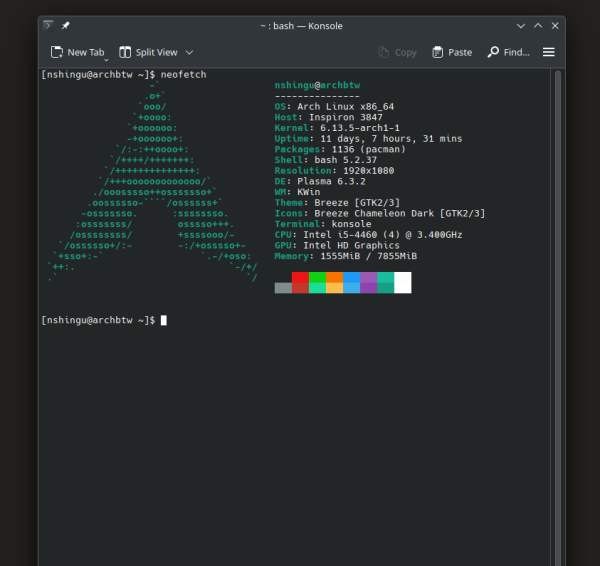
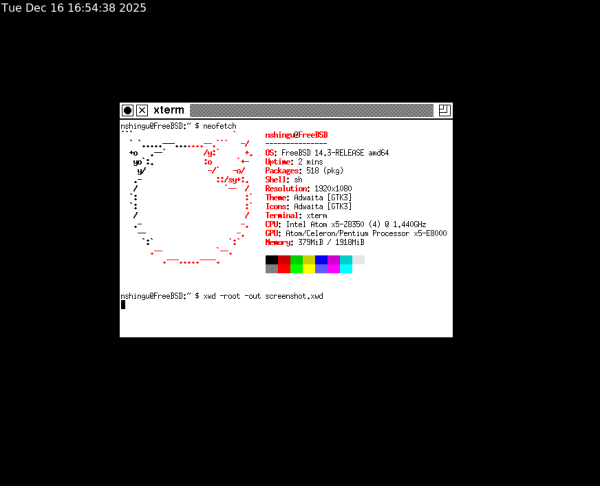
Memory usage varies greatly depending on the desktop environment (GNOME, KDE, Xfce, twm, etc.) you use rather than depending on the distribution. Please select the appropriate GUI according to the specifications of your PC.
For Arch+KDE (1555MiB)
For KDE Plasma, implementation is possible in several hundred MB.
For FreeBSD+twm (379MiB)
For twm, the minimum configuration can operate with about 1MB.
As for the difficulty level of the distribution, it is my personal opinion, but it is based on the ease of installation, the effort of initial setup, the amount of information in case of trouble (is there information in Japanese), etc.?
The following is an introduction to Linux distributions.
For beginners who want to use it safely
Linux Mint (difficulty level)
If you want to use your old PC like Windows, Mint is the best choice. You can use it immediately after installation, no special knowledge is required. It also supports Japanese. A 32-bit version also exists if it is based on Debian.
Zorin OS (Difficulty to Easy)
Based on Ubuntu, you can choose a layout similar to Windows or macOS. It is especially suitable for people who want to make a smooth transition from Windows, especially since it allows you to switch to a Windows-like UI.
For beginners who want to learn Linux
Ubuntu (Difficulty to Easy)
Linux is the top usage OS for users, and the amount of information is overwhelming. You can almost always find a solution to your problem. Great for learning the basics of Linux in general, such as systemd and APT.
For those looking for a macOS-like design
elementary OS (difficulty level)
Although based on Ubuntu, it uses the proprietary Pantheon desktop environment, which provides a macOS-like UI and experience. Recommended for those who like the design of macOS.
For those who prioritize stability
Debian(Difficulty to Easy)
Thoroughly tested stability is the main feature. Suitable for server applications and environments that require stable operation over a long period of time. Although the packaging is old, it is extremely reliable. A 32-bit version is also available.
MX Linux (Difficulty to Easy)
Based on the stable version of Debian, it is lightweight and easy to use. There are also plenty of tools for beginners.
For commercial Linux learning
Suitable for learning enterprise Linux such as RHEL and SLES. Learn about functions important in corporate environments, such as SELinux and Firewalld.
Fedora (difficulty level)
RHEL upstream projects allow you to quickly adopt the latest technology. With a release cycle of approximately every 6 months, it is suitable for those who want to be the first to try out new features and technologies.
openSUSE (difficulty to easy)
YaST is often mentioned as a feature of the SUSE system, but personally, the big advantage is that it can be recovered from snapshots directly from GRUB.
This is possible with some major distributions such as Ubuntu, but I think the strength of openSUSE is that it can be used as a standard feature without any configuration required.
AlmaLinux / Rocky Linux (difficulty to easy)
It appeared as a free clone of RHEL and is a representative successor to CentOS. Ideal for learning and testing commercial environments.
Oracle Linux (difficulty level)
Compatible with RHEL and suitable for learning the Oracle database environment. There is a paid version available if you require enterprise support, but it is generally available for free.
For those looking for customizability
Gentoo (high difficulty)
If you are looking for customizability, this is the perfect OS. Since it is basically compiled from source, you can generate binaries that are optimized for your own CPU, but the compile time is quite long. Building Firefox can take several hours, so you’ll need some extra time. The Gentoo Handbook has great value as a learning material because you can proceed while understanding “why this setting is necessary.” It also supports the 32-bit version.
Arch Linux (difficulty medium to high)
People say it’s “difficult,” but the reality is different. You will need to manually configure the boot loader and partition settings during installation, but if you are familiar with the CLI, there is no problem if you follow ArchWiki. Recently, there are useful commands such as archinstall, so I don’t think it’s that difficult. Unlike Slackware, you don’t have to build it from scratch, and the only difficult part is the setup stage.
pacman is easy to use and has access to the latest software in AUR. The great thing about it is that you can install only what you need and build your own environment.
Manjaro (difficulty level)
It is Arch-based but provides a graphical installer and configuration tools. It benefits from Arch’s flexibility and rolling release, and is easy to use even for beginners. For people who want to use Arch easily.
For those seeking Unix philosophy
Slackware (high difficulty)
This is the OS that I personally think is the most difficult. There is no automatic resolution of dependencies and many must be built from source. Perfect as a learning material. It also supports the 32-bit version.
Furthermore, it uses SysVinit, making it the most Unix-inspired of all Linux distributions.
It has a philosophy similar to BSD OS, such as system management using simple shell scripts and a highly transparent configuration file structure. If you are planning to learn FreeBSD, OpenBSD, etc., I think your experience with Slackware will be quite educational.
Devuan (difficulty level: easy ~ medium)
This is a distribution derived from Debian that does not use systemd. Installation is similar to debian and easy. I believe the default GUI was Xfce.
In my case
Currently, the web server is OpenSUSE TW, the FW server is FreeBSD, and the client PC is ArchLinux, Debian, etc. (the company runs SlackWare, etc.).
openSUSE TW is a rolling release, but it has a snapshot function, so you can rest assured that you can immediately revert to an update if a problem occurs. It is ideal for applications that require frequent updates but also require stability, such as web servers. Personally, I didn’t have a good impression of systemd, but I decided to give it a try, and found that the snapshot feature was quite easy to use and I liked it.
I chose FreeBSD as my FW server because I liked the simplicity of the pf firewall and the central management of settings using rc.conf. After getting used to systemd, when you touch rc-related settings, you realize again that simplicity is good.
On the client PC, I use Arch and Debian. I use Arch as an environment where I can immediately try out the latest software, and Debian as my main machine that I want to use stably for a long time.
*FreeBSD is not Linux, but it is an OS that purely inherited the Unix philosophy. The simplicity and transparency of being able to centrally manage system settings with rc.conf is something we can learn a lot from now that systemd is at its peak.
まとめ
With the spread of systemd, many distributions now have a common base. There are almost no differences in FHS, so I recommend choosing a distribution depending on your purpose and trying out multiple distributions if possible. If you try Slackware or BSD systems that do not use systemd, you will be able to experience the difference in design philosophy and will greatly deepen your understanding of Unix systems.
I hope this will be helpful to someone.
End